
Do you need a device that travels easily, or one with more power for demanding tasks? The right choice depends on where you work, study, and travel. This guide to the lightweight vs performance laptop choice can help you match your needs to your budget.
Ultrabookreview.com has tested and reviewed thin-and-light models for more than 15 years. Its buying guide covers portable options available in the second half of 2026. We’ll compare daily responsiveness, battery life, carry weight, display comfort, and ports for common accessories.
We’ll also look at higher-powered choices for creative work, including an HP Envy configuration with NVIDIA GeForce MX450 graphics. Prices and specifications are examples, not live quotes. For instance, the guide lists a Dell XPS 13 configuration at about INR 1,24,990.
RentLappy offers another way to get the technology you need. Its mission is to make devices more accessible, affordable, and flexible for startups, businesses, freelancers, and schools. Renting may suit you if you want to avoid an outright purchase.
Key Takeaways
- Your work habits can guide your choice between easy carrying and extra computing power.
- Compare battery expectations, weight, screen comfort, and useful ports.
- Creative tasks may call for a graphics-capable model, such as the HP Envy option with MX450 graphics.
- Listed prices and specifications are examples, not guaranteed current offers.
- RentLappy provides a flexible rental option for individuals and organizations in India.
What Lightweight vs Performance Laptop Means for Your Work Style
Your workday, not a spec sheet, should set the direction. Commuting, travel, and remote work can make a 1.41 kg device easier to carry than a larger design. For desk-based tasks, extra processing power may matter more than low weight.
Portability for commuting, travel, and remote work
The Lenovo IdeaPad Slim 3i is listed at INR 43,990. Its 14-inch FHD display suits everyday documents and browsing. The listed battery life reaches up to six hours, though actual battery time can vary with settings and tasks. Check the display in person, and ask whether an FHD IPS panel is available on the exact model.
Power for demanding apps and multitasking
For heavier apps, the Dell Inspiron 7415 configuration uses an eight-core AMD Ryzen 7 5700U processor. Intel Core or AMD Ryzen branding alone cannot tell you which choice fits. Check the exact chip, cooling, memory, and workload. Also consider keyboard comfort and where you will use the device.
“Choose for the work you do most—and the places you do it.”
A light laptop may suit frequent travel, while office-based work can favor other options. Compare the details before deciding.
| Work need | Example | What to check |
|---|---|---|
| Daily travel | Lenovo IdeaPad Slim 3i | 1.41 kg weight and compact design |
| Routine tasks | 14-inch FHD display | Up to six hours of listed battery backup |
| Demanding apps | Dell Inspiron 7415 | Eight-core chip for multitasking |
How Lightweight Laptops Support Everyday Productivity
A smooth workday can start with a device that feels easy to carry. For students and mobile professionals in India, frequent trips between home, transit, classrooms, and offices make portability useful.
Comfortable Carry Weight and Compact Designs
The LG Gram is listed at just 990 grams, so it can make a daily commute feel less taxing. Its thin, light design suits people who move often. A light laptop still needs to feel right in use: check screen comfort, keyboard feel, and the IPS display before choosing. Many laptops offer different panel options, so confirm the exact display on sale.
Battery Life for Working Away from a Desk
The LG Gram has a 72 Wh battery. The Apple MacBook Air M1 is listed at 1.25 kg and up to 18 hours of battery life. The Lenovo IdeaPad Slim 5 is listed with a 56.5 Wh battery and up to eight hours of backup. These figures are estimates, not promises. Bright screens, video calls, and demanding apps can shorten battery life. Compare laptops by your typical routine, not claims alone.
“Easy to carry matters most when it still feels comfortable to use.”
What Performance Laptops Do Best
Some projects ask more from a computer than browsing and email. A stronger setup can help with video editing, programming, and large multitasking sessions.
More power for demanding tasks
The listed HP Envy model offers a clear example: an Intel Core i7-1165G7 processor, NVIDIA GeForce MX450 graphics with 2 GB VRAM, 16 GB RAM, and a 1 TB SSD. This mix can suit creative work and pro-level multitasking.
A dedicated graphics card can help with visual tasks, but cooling and power limits affect sustained performance. Also, AMD Ryzen and Intel Core name processor families; they do not describe graphics hardware. Check the full spec sheet, including the chip and graphics card, before you buy. A performance-focused design may cost more or weigh more, so match the model to your regular workload.
“Choose extra power when your daily work can make good use of it.”
Lightweight vs Performance Laptop: Key Differences to Compare
One specification rarely tells the whole story. For work or study in India, compare weight, size, processor, RAM, battery capacity, display, keyboard, and build quality together. This helps you see which options fit your daily routine.
The Lenovo IdeaPad Slim 5 is listed at 1.39 kg with a 56.5 Wh battery. It offers a useful reference for a portable productivity model. The Dell XPS 13 is listed at 1.27 kg and 15 mm thick, which may appeal if easy carrying matters most.
Screen details also shape comfort. An FHD IPS display can suit everyday tasks, while a larger battery may extend expected runtime. Actual results depend on settings and workload. Check the display and keyboard in person when possible.
Think about what each design gives you: extra performance, easier portability, or a more comfortable keyboard. The right model balances these gains without relying on one spec alone.
| Comparison point | IdeaPad Slim 5 | Dell XPS 13 |
|---|---|---|
| Listed weight | 1.39 kg | 1.27 kg |
| Battery capacity | 56.5 Wh | Not specified here |
| Listed thickness | Not specified here | 15 mm |
Lightweight Laptop Options for Students and Mobile Professionals
Students and mobile professionals in India can choose from premium designs and more budget-friendly models. Compare comfort, screen needs, and price before you decide.
Premium picks for frequent travel
The ASUS Zenbook 14 is a premium portability option. This ASUS Zenbook model weighs 1.39 kg, packs a 75 Wh battery, and has a 2.8K OLED display. Its build quality and compact design may suit frequent commuters.
Dell XPS models also favor compact construction. The listed Dell XPS 13 weighs 1.27 kg and measures 15 mm thick. Check the exact processor and features for each model.
Everyday choices for study and work
The Apple MacBook Air M1 weighs 1.25 kg and lists up to 18 hours of battery life. Apple MacBook options can suit daily tasks, but confirm that the operating system fits your needs.
For a lower price, the Lenovo IdeaPad Slim 3i is listed at INR 43,990. This Lenovo IdeaPad has a 14-inch FHD display, while other Lenovo IdeaPad models may vary.
Before buying a laptop, compare keyboard feel, screen size, resolution, and brightness. Check for an IPS display, FHD IPS panel, or touchscreen if those matter to you. Try the keyboard and display in person when possible.
Thin-and-Light Laptops That Balance Mobility and Power
For professionals who move between client visits and a desk, a compact business machine can make daily tasks easier. The right choice should also feel comfortable during long work sessions.
Lenovo ThinkPad Models for Business-Focused Work
Ultrabookreview.com lists the Lenovo ThinkPad P1 among its premium options. Before ordering in India, confirm the exact configuration, processor, and local price. Business-focused Lenovo ThinkPad models may appeal to people who value durable build quality, practical design, and a familiar keyboard.
For portability, the Dell XPS 13 offers a useful comparison. The listed model weighs 1.27 kg and has a display rated at 500 nits. The phrase “thin light” describes a design goal, not a promise of strong results for every task. Specs vary by model.
Choose the configuration that fits your work, not just the look.
- Compare keyboard comfort and screen brightness in person.
- Check whether the IPS display suits your viewing needs.
- Match each laptop’s weight and processor to its price.
ThinkPad laptops can suit office routines, while other models may better fit frequent travel. Test the keyboard and screen when possible, then check the full specification before you decide.
Performance Laptop Options for Creative and Technical Work
Creative projects can place different demands on a computer. For video editing and visual work, a dedicated graphics card may help, but the right fit depends on your apps and files.
Look for NVIDIA GeForce graphics for video editing and visual workloads
The listed HP Envy configuration includes NVIDIA GeForce MX450 graphics with 2 GB VRAM. This discrete card may help with some visual tasks. Still, judge a model by your software, project size, resolution, and workload—not its GPU name alone.
Also compare the processor, RAM, storage, display quality, and battery. An AMD Ryzen chip or an OLED screen may suit your needs, depending on the apps you use.
Consider MacBook Pro models for sustained creative work
The source notes that MacBook Pro models use active cooling, which can support steadier work over long sessions than the MacBook Air. An Apple MacBook Pro may suit demanding tasks, while Apple MacBook choices vary by configuration. Check current models and specifications in India, since each year can bring new options.
“Match the tool to the work you do most.”
Compare laptops by real needs, not claims alone. Apple MacBook Pro options and other laptops can differ in processor, storage, and screen features.
Intel Core vs AMD Ryzen: Choosing the Right Processor
Compare the exact chip and your daily tasks, not just its brand. Neither Intel Core nor AMD Ryzen wins in every case. Cooling and power limits also shape what a chip can do during long work sessions.
The ASUS Zenbook 14 is a useful example. Listed options include a 12th-generation Intel Core i5-1240P and a 12th-generation Core i7-1260P. Both are described as 12-core chips, but core count alone does not tell you how they will handle your apps.
Generation, sustained power, software needs, and design all affect real-world performance. Think about the jobs you do most, from documents and browsing to programming or creative tools. A stronger chip may help with complex tasks, but it may not add value for basic office work.
- Compare AMD Ryzen and Intel Core options by chip, workload, and cooling.
- Check RAM capacity and upgrade options along with the processor.
These details can help you choose among models with care. Match each model to your needs before you buy a laptop in India, and avoid paying for power you rarely use.
How RAM and Graphics Cards Shape Laptop Performance
Memory helps a laptop keep several apps and browser tabs active. The ASUS Zenbook 14 lists 16 GB of LPDDR5 RAM, which can keep common tools ready as you switch tasks.
The HP Envy configuration offers 16 GB of DDR4 RAM and supports upgrades to 32 GB. Check whether RAM is soldered or upgradeable before purchase; the two examples differ in memory details.
A graphics card can aid visual editing, but the processor, cooling, and app demands also shape performance. The HP Envy’s NVIDIA GeForce MX450 card may suit some creative tasks. An Intel Core name alone cannot predict results.
Compare display quality, battery life, and keyboard comfort. An IPS display may help with viewing, while brightness and workload affect battery life. For laptops in India, balance these needs and check the model’s full specifications before choosing.
| Use case | Listed setup | What to check |
|---|---|---|
| Memory | Zenbook: 16 GB LPDDR5; HP Envy: 16 GB DDR4, expandable to 32 GB | Confirm upgrade options |
| Visual work | HP Envy with NVIDIA GeForce MX450 graphics | Match apps and cooling needs |
| Everyday tasks for laptops | Comfortable screen and typing setup | Balance features and cost |
Battery Life, Weight, Display, and Keyboard Trade-Offs
Long days away from a desk call for more than a large battery. Consider carry weight, screen comfort, and typing feel together before choosing a device.
Compare runtime with carry weight
The Lenovo IdeaPad Slim 5 lists up to eight hours of battery life, but treat that figure as an estimate. Video calls, high brightness, and demanding apps can shorten runtime. The LG Gram pairs a listed 72 Wh battery with a weight of 990 grams, while the Apple MacBook Air M1 lists up to 18 hours. Your results will vary with everyday use.
Check typing comfort and screen brightness
Try the keyboard in person if you can. A comfortable layout matters during long work sessions, especially when you type often. The IdeaPad Slim 5 lists a 300-nit display; check its brightness in the places you plan to work. Also compare IPS and OLED options, screen size, and typing feel. These details shape comfort as much as the laptop’s design.
“A good fit feels right in your hands and lasts through your workday.”
For laptops used on the move, balance battery life with comfort rather than relying on a single spec.
OLED vs IPS Displays: Screen Quality for Work and Entertainment
A screen can shape how comfortable work and entertainment feel. OLED and IPS displays differ in contrast, color, brightness, and power use, so compare the full panel details before you choose.
The ASUS Zenbook 14 lists a 2.8K OLED display with 600-nit brightness, a 90 Hz refresh rate, and 100% DCI-P3 color coverage. That OLED panel may suit vivid films, photo work, and smooth scrolling. The Dell XPS 13 lists an IPS panel rated at 500 nits. Its IPS display offers a different balance of color and contrast.
Check more than the panel type. Match resolution and refresh rate to your apps, then decide whether a touchscreen matters. Color coverage can help with design work, while everyday browsing may need less. A high-quality display can benefit pro creative work, but its value depends on the content you use. Compare an OLED display with an IPS display in person when possible, and choose the screen that feels right for your daily tasks.
“The best screen is the one that suits the work and content you enjoy.”
Ports and Connectivity to Check Before Choosing a Laptop
Ports affect how easily your laptop fits into your work setup. Before you choose, list the accessories you use each week, such as an external display, storage drive, headphones, and memory cards.
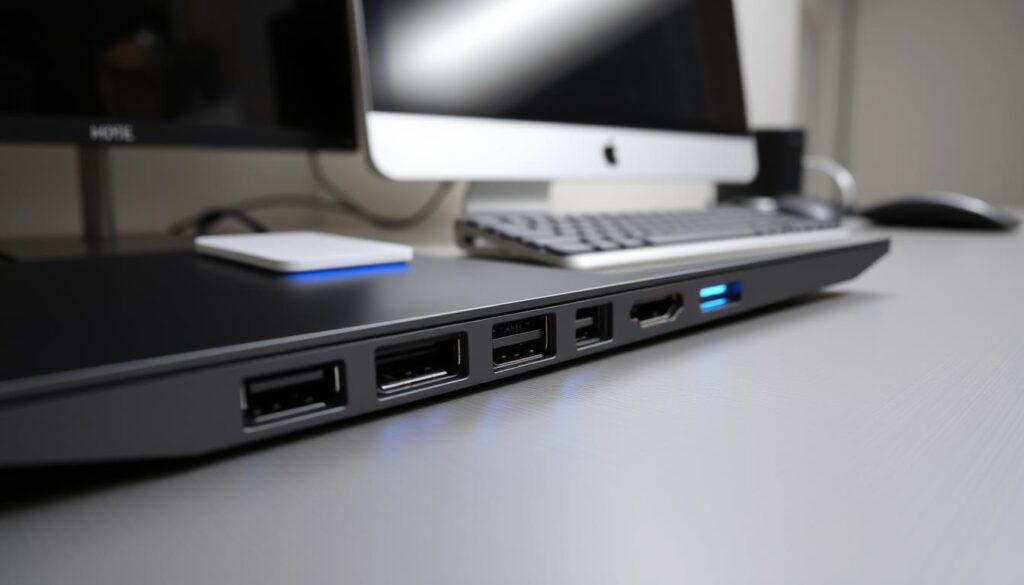
For buyers comparing laptops in India, a few checks can prevent the need for extra adapters. Also consider Wi-Fi and Bluetooth support for office networks and wireless accessories.
Match Connections to Your Accessories
- The Lenovo IdeaPad Slim 3i lists USB 3.1, USB 2.0, HDMI 1.4b, and an SD card reader. These ports cover common wired devices.
- The ASUS Zenbook 14 lists HDMI 2.1, USB-A, USB-C, and a microSD card reader. Check which ports your gear needs.
- USB-C features vary by model. Confirm whether it supports charging, video output, or data transfer before buying. A card reader can also save time when moving photos.
- If you use a card reader often, check its format and location. Confirm the ports suit your touchscreen setup, too.
Review the full specifications, since names alone may not show what each connection supports. Matching ports to your current gear can keep your desk simple.
How to Match a Laptop to Your Work Style and Budget
Start with the tasks you do most. Then compare processor, RAM, battery life, display brightness, keyboard comfort, and carrying needs. An Intel Core chip may suit some workloads, but check the exact model and its full configuration.
Listed prices offer a useful starting point, not a promise of today’s price. The Acer Aspire 5 was listed at INR 52,990, the Lenovo IdeaPad Slim 5 at INR 61,990, and the Dell Inspiron 7415 at INR 89,990. Treat these as dated examples; prices and stock can change during the year.
- For everyday work, compare practical options and total cost.
- For travel, consider size, weight, and battery life.
- For demanding apps, check performance needs and cooling.
Before you buy, verify the current price, warranty, configuration, and stock in India. The Dell XPS name alone does not confirm which features a model includes. Compare the design and features that matter to you.
If you only need a device for a short project, event, training session, or remote-work assignment, consider renting. It can offer flexible options without a full purchase. Choose what fits your work and budget this year.
Rent Laptops and IT Equipment from RentLappy in India
RentLappy helps make technology more accessible, affordable, and flexible across India. Its rental service supports businesses and individuals who need equipment for a set project, event, or work period.
Flexible rentals for teams and learners
Startups, corporates, freelancers, and educational institutions can rent a laptop for remote work, training, classes, or a short-term project. These options can help teams manage costs without buying devices they may not need all year.
Equipment for different business needs
Choose laptops, desktops, servers, and networking equipment from an experienced rental partner. Founded by IT and electronics professionals with over 12 years of industry experience, RentLappy serves more than 5,000 customers in metro cities and tier-2 and tier-3 towns. Ask about models, build quality, battery needs, price, and laptops available for your work. A second laptop may also help when teams grow or plans change.
Contact RentLappy in Okhla, New Delhi
Share your needs to discuss a suitable model and rental period. Visit D-97, Okhla Phase 1, Okhla Industrial Estate, New Delhi – 110020, call +91-60003 70013, or email sales@rentlappy.com.
Conclusion
Choose a lightweight laptop for frequent travel and daily tasks. If demanding work is routine, a performance-focused model may justify the added capability.
Before you decide, compare processor, RAM, display, keyboard, weight, ports, and realistic battery life. Compare laptops by how battery use fits your apps and schedule. Specs and price can change, so confirm current availability in India, exact configuration, warranty, and cost.
For an event, training, short project, or remote work, renting keeps plans flexible. RentLappy helps make technology more accessible and affordable through flexible rentals of laptops and IT equipment across India. Explore its options to get what you need without an outright purchase.